# Slides Editor - Open Source
**URL:** https://connect.oeglobal.org/t/slides-editor-open-source/9666
**Category:** Sharing Zone
**Created:** [November 4, 2026, 11:02pm UTC](https://connect.oeglobal.org/t/slides-editor-open-source/9666 "2026-11-04T23:02:28Z")
**Posts on this page:** 4
**Page:** 1
### Author:  [@Mauricio](https://connect.oeglobal.org/u/Mauricio)
#### Post date: [November 4, 2026, 11:02pm UTC](https://connect.oeglobal.org/t/slides-editor-open-source/9666/1 "2026-11-04T23:02:28Z")
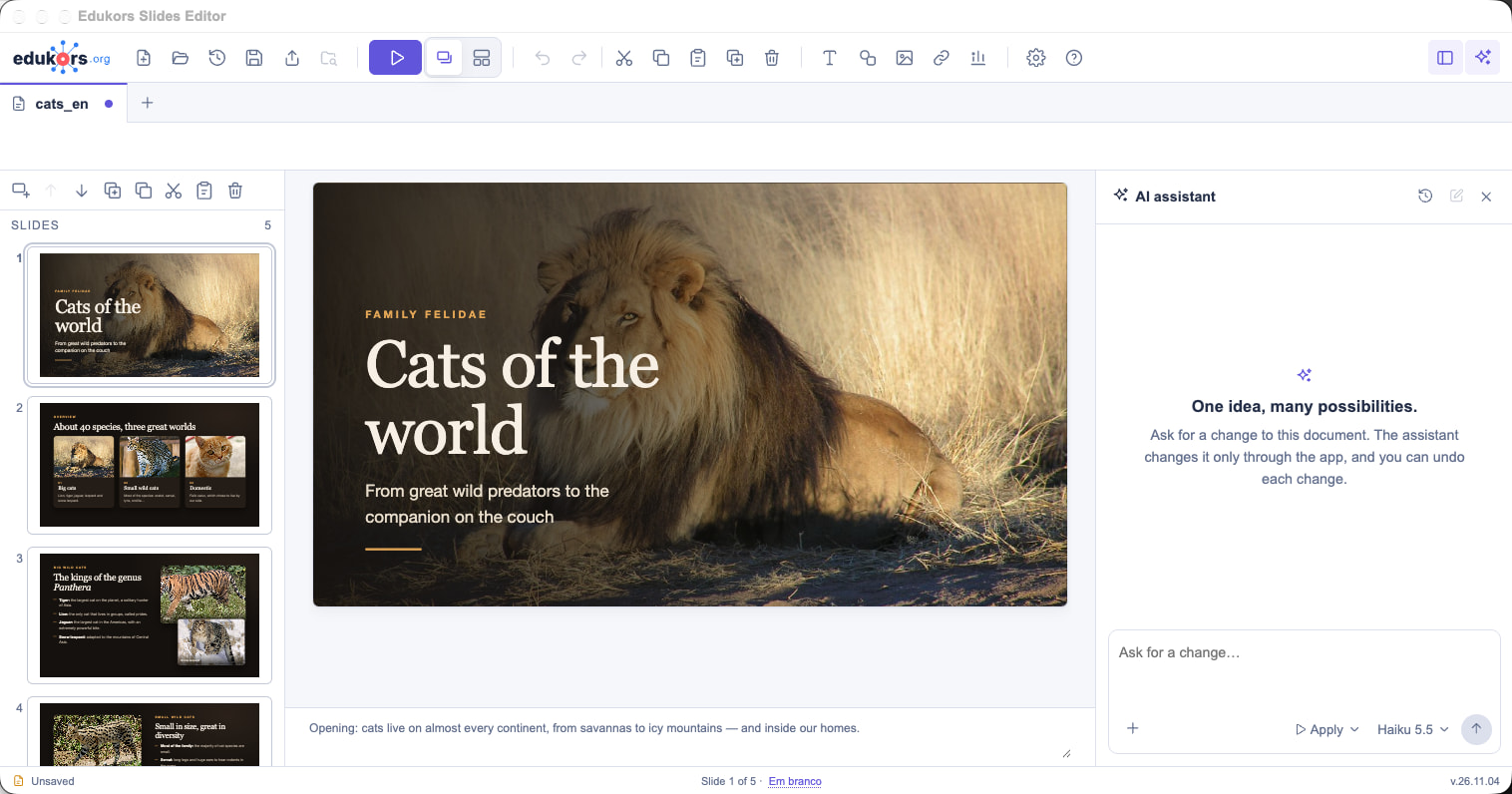
Today I launched another app: Edukors Slides Editor, a free and open-source presentation editor made for teachers.
Each presentation becomes a single HTML file that opens in any browser, even without internet access. No cloud account or subscription is needed.
What it does:
• It has an AI assistant that creates slides, searches the web, and changes the visual appearance.
• You can also edit manually directly on the slide, moving and typing.
• It asks live questions, which the class answers via mobile phone using a QR code.
• It comes with a pen, magnifying glass, infinite whiteboard, and presenter panel.
Why is it different?
Many people are already using Claude, ChatGPT, etc., to generate slides. But each touch-up, each small adjustment requires a new AI call. Edukors Slides allows you to both use AI and edit the slides directly.
Regarding specific applications (PowerPoint, Google Slides, Gamma), Edukors Slides has the advantage of being free, without watermarks, and without limits.
To download and install (Windows, Mac, and Linux):
[https://edukors.org/slides](https://edukors.org/slides)
---
### Author:  [@cogdog](https://connect.oeglobal.org/u/cogdog)
#### Post date: [November 5, 2026, 2:14pm UTC](https://connect.oeglobal.org/t/slides-editor-open-source/9666/2 "2026-11-05T14:14:39Z")
Thanks for sharing Edukors Slides, Mauricio, it looks like an interesting combination of tools, especially with the interactive features, and as how you describe it, the ability to edit outside of turning to the AI prompt. Plus that iut creates stand alone outputs in HTML is fantasric.
I did download a copy, but as someone who rarely creates slides much less generates them, I’m not the best test subject.
I’m wondering if there are perhaps some examples of what it can produce, or maybe people here can help create some. Nothing against slideshows of cats, but I always find seeing real examples helps me understand what a tool can do.
But more than that, I’m interested in understanding what is the workflow like to go from a first prompt to refinement. Does one really start with something like in the docs _“Create a cover and three slides on fractions for 6th grade.”_
More questions- does it create alternative text for images? Or for that matter, is it generating all images or can it use/attribute sources?
Again, I am hoping someone who maybe could give Edukors Slides a better run through than me can share what they create/generate.
Thanks again for making and sharing these tools. And maybe (get used to me repeating this often), consider offering a how to session or workshop for [Open Education Week 2027](https://oeweek.oeglobal.org/)?
---
### Author:  [@Mauricio](https://connect.oeglobal.org/u/Mauricio)
#### Post date: [November 5, 2026, 11:52pm UTC](https://connect.oeglobal.org/t/slides-editor-open-source/9666/3 "2026-11-05T23:52:54Z")
Thanks, Alan @cogdog
Here’s a real example: a presentation I gave recently to Curtis Barness, CEO of 1EdTech, and some of his staff, about another project of mine:
> **[Presentation 1Edtech.html](https://edukors.org/content/presentations/Presentation_1Edtech.html)**
On the workflow: a one-line prompt like “Create a cover and three slides on fractions for 6th grade” works as a quick start, but it’s not how I usually work. For this presentation, I first wrote an outline of what I wanted to say and gave it to the AI as context. Then I refined it step by step, sometimes asking the AI for changes, sometimes editing the slides directly. That mix is the main idea behind the tool: you don’t need a new prompt for every small fix.
On images, both options work. The AI can generate them, or you can use existing images and credit the sources. What the AI can generate depends on which model you use: Codex can produce both bitmap and vector images, while Claude produces only vector images.
As for Open Education Week 2027, it would be an honor to offer a how-to session or workshop.
---
### Author:  [@Mauricio](https://connect.oeglobal.org/u/Mauricio)
#### Post date: [November 6, 2026, 12:01am UTC](https://connect.oeglobal.org/t/slides-editor-open-source/9666/4 "2026-11-06T00:01:13Z")
And here’s another presentation made with Edukors Slides Editor: a lecture I recently gave at the University of Pennsylvania Graduate School of Education.
> **[UPenn-2026.html](https://edukors.org/content/presentations/Guest_Lecture_UPenn.html)**