There’s quite a few moving parts to explore and find here in the OEG Connect conference space, so we have made a “map” to guide you (this was created with a nifty tool you will find information on how to remix my map in the Interaction Zone).
The Map
The map reflects participation from those attending in person in Cambridge, those attending anywhere online, and those gathering at the satellite conference event in Vancouver. All particpants have access to and are encouraged to navigate to the red line for the locations here in OEG Connect.
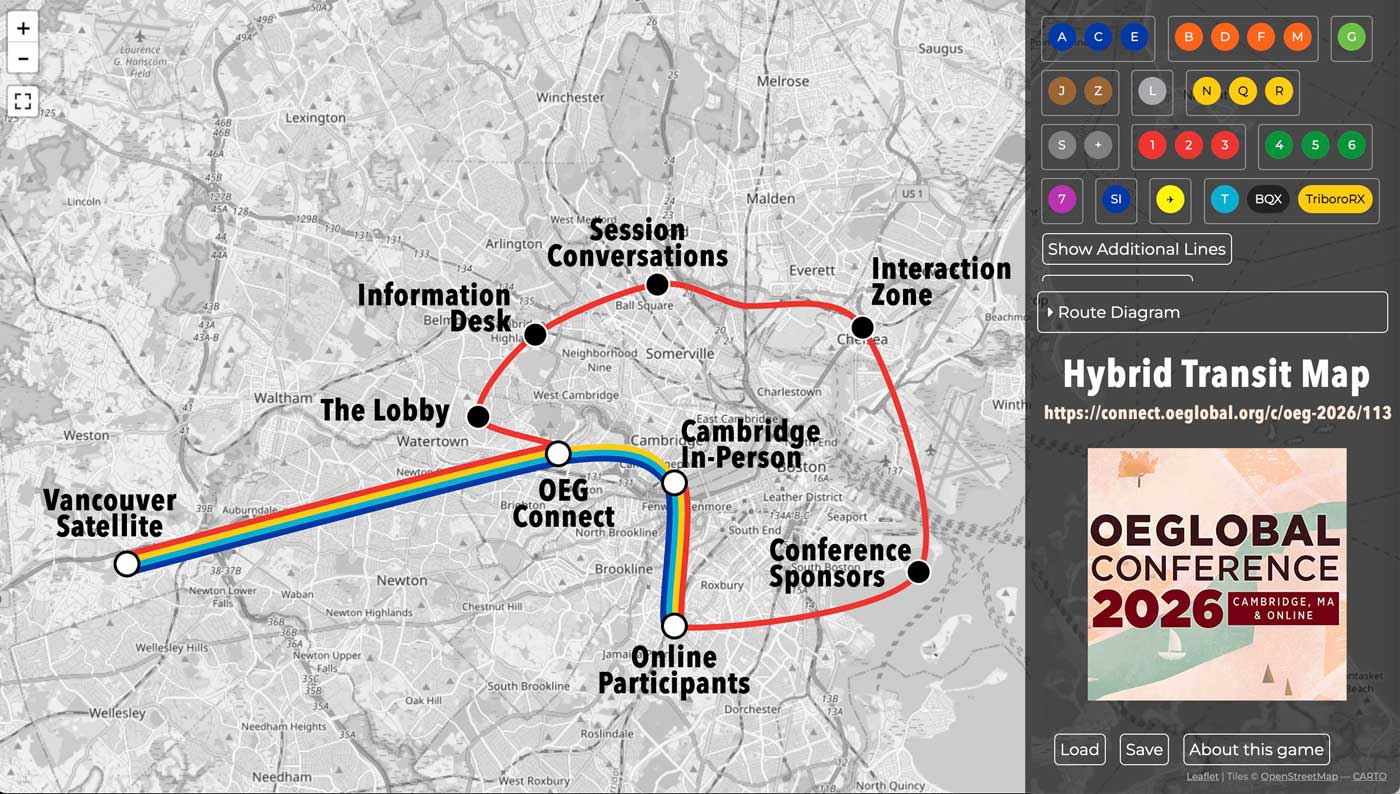
Under each of the main stops in OEG Connect listed below, you will find specific links to topics you may want to read or participate in.
OEG Connect Main Entrance
Always start from the OEGlobal26 main entrance. You swill see listed there the main spaces and links to the most recent discussions.
The Lobby
This is a place to meet other attendees, introduce yourself, find others to network with. Come and mingle, scan the latest discussions https://connect.oeglobal.org/c/oeg-2026/lobby/
Suggested stops include:
- We Welcome You to OEGlobal 2026 An official welcome from OEGlobal, Reply to say hello share your goals for the conference
- Poll: First Timer or Many Timer at an OEGlobal Conference Respond to the poll to share how many OEGlobal Conferences you have attended, or 0 to indicate being a first time attendee. If you are new, there are others here to share advice.
- Vancouver Satellite event Learn about the activities and events being planned for the conference satellite location in Vancouver
- Meet the Conference Sponsors and Exhibitors
- Hybrid Connecting Sessions as places for online Hallway Conversations and connecting the online and in-person attendees during conference breaks
- Poll: Hashtag OEGlobal26, Where in Social Media Will You Share?
- Get Local Advice, Just Ask! Coffee? Where to find a good cup of coffee, ask or share
- Where Are the Good Book Stores? Ask the Locals! Find or help others find local book stores
- Get Your OEGlobal 2026 Wearables! order OEGlobal 2026 branded t-shirts, sweatshirts, tote bags, etc
- Lodging Advice and Questions share information about finding lodging and learn how to join a private opt-in group for those wishing to coordinate/share rooms
- Private Opt-In Discussion Space for Accessibility Connections Learn how to join another private discussion group set up for anyone wishing to coordinate or address accessibility challenges.
Assistance Available at the Information Desk
This is where we will post guides for navigating the conference and how to contact us for assistance. scan the latest discussions https://connect.oeglobal.org/c/oeg-2026/info-desk/.
A few suggested stops:
- You Have Arrived in the Online Place for OEGlobal 2026! The landing page for new OEG Connect users who join via the special invitation link
- For Satellite Event Attendees in Vancouver: Welcome to OEG Connect A similar welcome guide for anyone attending the Satellite event in Vanocuver who join OEG Connect via the invite link made for the Vancouver participants.
- An OEGlobal 2026 Participant Guide to OEG Connect Helpful tips for using the OEG Connect platform
- Accessibility Tips for Uploading Images in OEG Connect Learn how to enter alternative text for images uploaded to OEG Connect.
- Create Your Own Private Discussion Channel Any attendee can create a private chat group for special interest groups to connect.
Share Highlights and Ongoing Discussions in Session Conversations
This is the place to talk about conference sessions, for presenters to share information, for participants to followup with comments and discussions. You can enter via pre-made topics for each of the conference sessions tracks ot start new topics directly in the Session Conversations https://connect.oeglobal.org/c/oeg-2026/session-conversations/116
Suggested stops include:
- Start Scouting the Program! What is on your list? a call to share sessions you are most interested in participating in and for presenters to “pitch” their sessions and tell you why you should attend.
- Adopt a Session (or several) to share back highlights, links, notes.
- Preset Discussions By Conference Track
- Conversations by Track: Hacking the Open Ecosystem and Praxis for the Public Good
- Conversations by Track: Innovating Open Content to Democratize Knowledge
- Conversations by Track: Catalyzing Human Connection, Creativity, and Curiosity to Thrive
- Conversations by Track: (Re)Inventing Our Shared Global Vision Together
- Conversations by Track: Exploring Emergent Technologies and the Future of Openness
We welcome any presenter or attendee to start a brand new topic to discuss a single presentation, just use the New Topic button from the Session Conversations area (see an example)
Asynchronous Activities in the Interaction Zone
Here we offer open discussions or things to do outside of the conference sessions to interact and connect, explore all (or add your own) in the Interaction Zone https://connect.oeglobal.org/c/oeg-2026/interaction-zone/
Suggested stops include:
- Ready for Remixing! The OEGlobal 2026 Digital Postcard Use the Remixer Machine to modify a digital postcard and share a greeting or message about the conference.
- Do Love Art? MIT Does! Guides and maps for public art near the conference venue. Visit and share a selfie!
- Good Will Hunting Scavenger Hunt | MIT Campus and Beyond! Try to find locations at or near MIT that were scenes from the movie, for example, find a chalkboard in a hallway and show how you solved the equation!
- What Are Your Earliest Memories of MIT Open Courseware? We are at the birthplace of the bold invention that lead to so much of what we do in Open Education. What memories do you have of first encountering MIT OpenCourseWare?
- Put yourself on the OER World Map a call for conference attendess to show their participation.
- Attendee OERigin Stories? Peter Musser shares the story of his entré to Open Education and asks you to share yours.
- From You to Cambridge, What’s Your Map Distance to OEGlobal 2026? Use an online map distance calculator to share how far you will travel to be in Cambridge or how far away you are as an online participant.
- Add a Patch to the OEGlobal 2026 Quilt Remix Another fun remixer activity, add a photo or image representing your conference experience to a collaborative digital quilt.
- Back By Popular Demand (and fun)– Open Petagogy Share openly photos of your pets!
- Online Participants: Show Us the View From Where You Sit Share what you see when sitting during an online session.
- 25 Steps: Show Us What You See From Your Front Door Give us a peek into where in the world you are or where you came from to be in Cambridge.
- Try Kōrero to explore Land and Waters Acknowledgment for Cambridge Explore a GenAI assistant to help craft a land acknowledgement as a visitor to Cambridge or where you are coming from.
Communicating Across the Hybrid Transit System
If you are registered for the conference and came here via our invitation link, you will be listed and can see everyone else in the Directory of OEGlobal 2026 attendees, offering an easy way to find and direct message any attendee who is also in OEG Connect.
The same is true for the attendees of the Vancouver Satellite event, you should have received a special invitation link from that events organizers, adding you to and enabling access to the OEGlobal 2026 YCR Satellite Event Directory.
We are experimenting as well this year with open chat channels here in OEGConnect that all conference participants can see and reply. Use to quickly reach out with a request or to share during live sessions. Callijng all parts of the map via:
- OEG26 Lobby Chat Try this to rally attendees to meet somewhere, to join an activity, or just to freely talk.
- OEG26 Session Chat Beyond the session conversations, send messages of key ideas, resources worth sharing from the sessions you attend.
- OEG26 Vancouver Chat A channel specifically for participants in ther Vancouver Satellite event for participant chat during sessions, but also to reach the wider conference audience.
- Create your own private / limited group chat This works like a group message channel in WhatsApp. Signal, etc. Create your own or see an example
Also useful for finding your way around, all new topics in the conference space of OEG Connect include at the bottom these navigation links.
OEGlobal 2026 Navigator
 Program in Sched
 OEGlobal 2026 Conference Web Site
 Main Space in OEGConnect
 Front Entrance public conversations “outside” the venue
For Attendees:
The Lobby meet attendees
Information Desk updates and help
Session Conversations discussion and sharing
Interaction Zone activities and things to do